For my Flash toysite assignment, I created a few backgrounds to match the Socorian I designed a while back. I designed an abandoned factory (from the outside) at night. It gives a dark feel to the toy. It's appropriate considering the fact that this toy was the predator of the project I did with Gabby. I created a school setting as well because I couldn't think of another theme at the time and school was frustrating me. I figured it'd be fun to destroy some imaginary pencils and paper.
Here's a link to the original sculpted Socorian
Developed in: Adobe Illustrator CS3
Edited in: Adobe Flash CS4 and Photoshop CS3
Friday, 7 January 2011
Wednesday, 5 January 2011
Vector for Video
I vectored this spooky background for a video assignment (Semester 3). It's part Tim Burton, part spooky owls. It was fun making it. I added texture to the ground so it wouldn't look so flat. I'm happy with the outcome, and it looked very nice in the film.
Developed in: Adobe Illustrator CS3
Edited in: Adobe Photoshop CS3
Developed in: Adobe Illustrator CS3
Edited in: Adobe Photoshop CS3
Flowers
I wanted to use a blossomed flower as a logo for myself, but I had some difficulties deciding on the design. This was one of them. I developed two versions because I wanted options. I used an image of a lotus flower I quite liked over the internet and began playing with some gradients. This one actually looks really nice from afar. I was tempted to keep it but decided my final design should be simple. Here's what it looks like anyway. It's still something I'm proud of.
Developed in: Adobe Illustrator CS3
Here's a different design for the blossoming flower.
Developed in: Adobe Illustrator CS3
Labels:
Adobe,
Flower,
gradients,
Illustrator,
Vector
Digital Painting
Here's a digital painting I did of my sister a year ago. We were in France and she posed for the camera. I thought it was a fun picture so I used Photoshop to dot out the picture. I'm very pleased with the outcome.
Reference Photo
Digital Piece
Developed in: Adobe Photoshop CS3
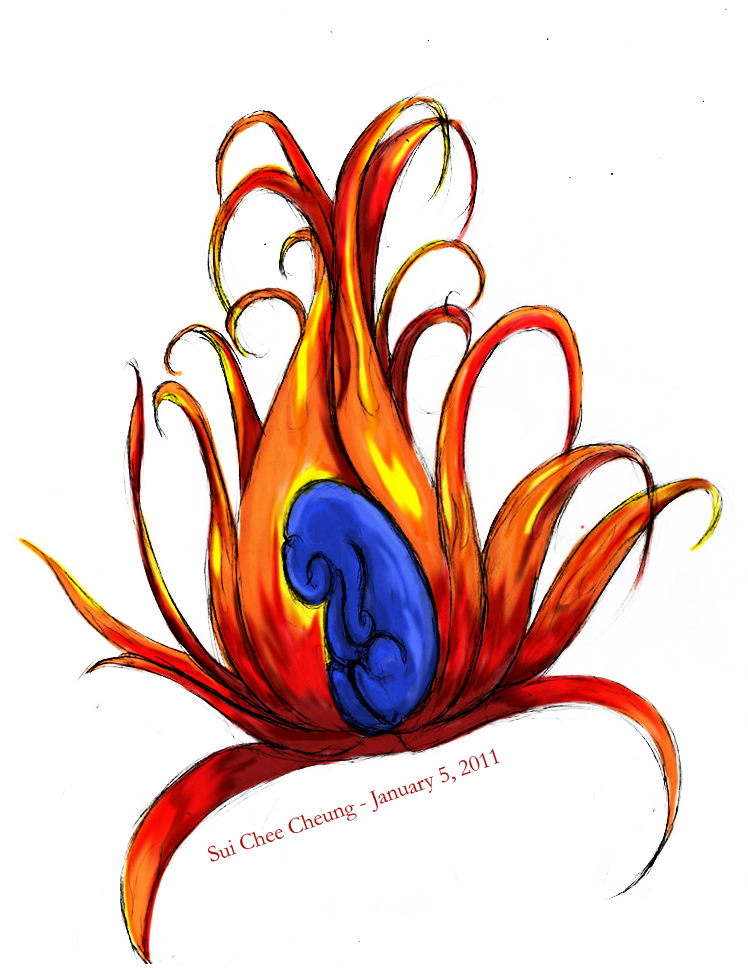
Flare Flower
This was a sketch I did a few years ago. I always wanted to colour it in, but I didn't do it until the winter holiday of 2010. I'm not that great with tablets, but tablet PCs (where you can draw touching the screen itself) made it possible. I had fun colouring this in. Using multiply modes, I was able to make a darker and lighter version.
Sketched by: Me
Coloured in: Adobe Photoshop CS3
Wednesday, 22 September 2010
First 3D piece
Completed my first 3D assignment and it was extremely fun! We had to build a snowman out of basic shapes, but I added a child because I thought it would be cute. There's a bit more texture than I expected (on the snowballs) but I really like how it came out. The monocle was fun to make. Transparency made it look more icy...well, rather than glass, but I love it anyway.
Developed in: 3DS Max
Tuesday, 21 September 2010
Kirby from Clay
Kirby was made over the summer as a gift for a friend of mine in the U.S. It's too bad I don't have a nice glaze for the acrylic paint. The lines wouldn't be as noticeable, but hey, it's cute, right?
Anyway, I started off with some tin foil and some Super Sculpey. The little guy isn't really big. He just fits in my hand. I apologize for the first blurry picture.
This is the result of cooking him for about five minutes. Because there's a ball of tinfoil inside and just a small layer of clay on top I didn't want to over do it. In fact I think his feet were beginning to burn once I took him out, so all in all I was happy with my result.
Anyway, I started off with some tin foil and some Super Sculpey. The little guy isn't really big. He just fits in my hand. I apologize for the first blurry picture.
This is the result of cooking him for about five minutes. Because there's a ball of tinfoil inside and just a small layer of clay on top I didn't want to over do it. In fact I think his feet were beginning to burn once I took him out, so all in all I was happy with my result.
Subscribe to:
Posts (Atom)